
GoldFynch allows you to delete a requested production at any time. This is especially useful when you want to test your production parameters and review the output before sharing the production set with others. Deleting a production only removes the produced set and its settings; it is a safe, low-risk way to experiment with different production options until you get the exact result you want.
Deleting a requested production
1. Click on the production icon in the left panel to navigate to the production view
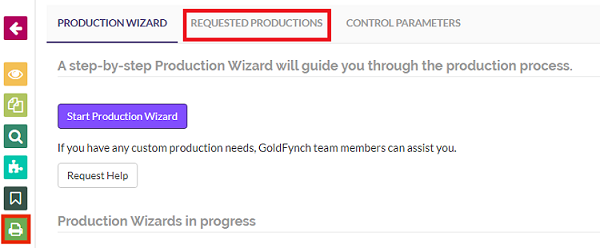
2. Click on the Requested Production tab
3. Click on the ... button against the production that you want to delete
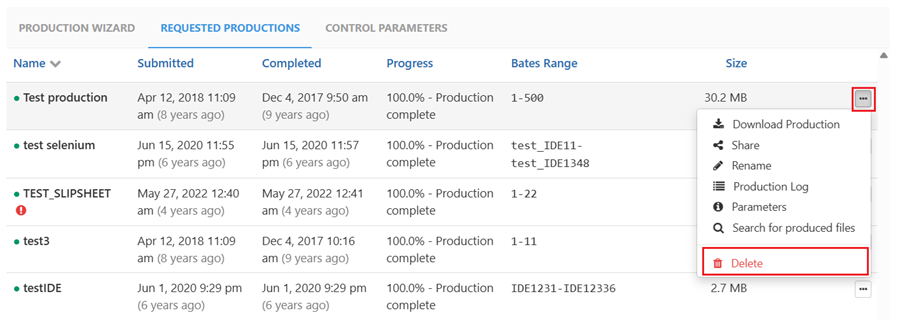
4. Click on the Delete option in the pop-up menu
5. Confirm the deletion when prompted
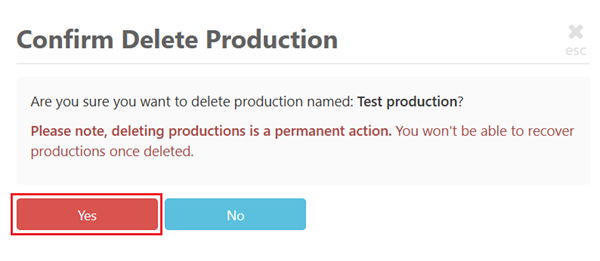 The production set, along with its associated settings, will be deleted and no longer appear in the Requested Production tab.
A great way to test your production parameters:
You can create a production using a chosen combination of parameters: Bates numbering, branding/endorsements, file format (native, image, or PDF), redaction handling, load file options, and more.
Once the production is generated, you can review the produced set to confirm everything looks correct. If the output isn't quite right, simply delete the production, adjust your parameters, and produce again. The ability to delete a production lets you iterate freely and verify that the final set meets your requirements.
Deleting productions makes it easy to trial-run your production settings before you commit to sharing a set.
Important:
Deleting a production will never affect the original documents that the production set was derived from.
A production is a separate, generated copy of your selected documents. When you delete a production, you are only removing that generated set and its settings: the source documents, in your case, remain completely untouched and available. This means you can delete and re-create productions as many times as you need without any risk to your underlying case files.
Note:
- Once a production has been deleted, it cannot be recovered, so make sure you no longer need the produced set before deleting it.
- If you intend to recreate a similar production later, consider using the "Re-use settings" option before deleting it, so you can quickly recreate the production with the same parameters. Click here for more details on re-using production settings.